Arduino Simple Simon Says

Scris de Denis Nuțiu
- 6 minute de citit
- 2 exemple de cod
- 3 imagini
Disponibil și în English
Pe această pagină
Acest articol este o republicare, originalul se află pe alt site.
Introducere
Am început acest proiect acum ceva timp, ca să mă familiarizez cu Arduino.
Vă voi oferi codul și instrucțiunile de cablare. Dacă aveți toate componentele pregătite, nu ar trebui să dureze mai mult de 30 de minute. Este și prima dată când scriu un ghid pe Hackster. Dacă credeți că greșesc în anumite aspecte sau dacă vedeți cum se poate îmbunătăți, vă rog să lăsați un feedback în secțiunea de comentarii.

Demo
https://www.youtube.com/watch?v=1kbH4HJgf20
Instrucțiuni de cablare
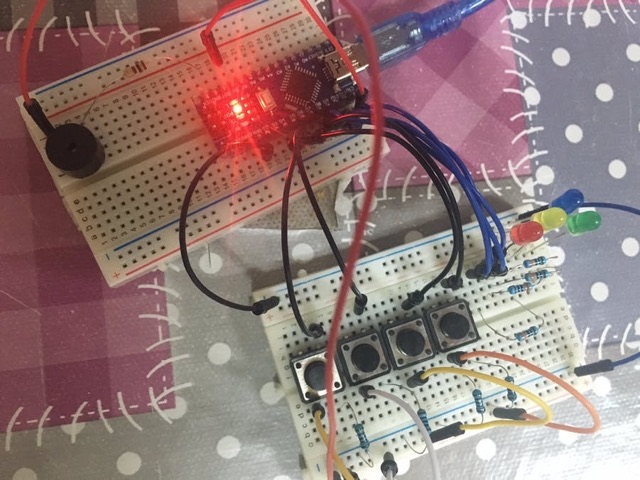
 Folosesc rezistențe pulldown de 1k pentru butoane, o rezistență de 100 ohmi pentru buzzerul piezo și rezistențe de 330 ohmi pentru LED-uri. Începeți prin a pune mai întâi butoanele și LED-urile, apoi adăugați rezistențele și, în final, firele de conexiune.
Următorii pini de pe Arduino sunt folosiți:
/* Pin settings */ static const int Game::MICROPHONE_PIN = 12; static const int Game::BLUE_PIN = 11; static const int Game::RED_PIN = 10; static const int Game::GREEN_PIN = 9; static const int Game::YELLOW_PIN = 8; static const int Game::BLUE_BUTTON_PIN = 7; static const int Game::RED_BUTTON_PIN = 6; static const int Game::GREEN_BUTTON_PIN = 5; static const int Game::YELLOW_BUTTON_PIN = 4; Apoi puteți personaliza frecvențele tonurilor sau seed-ul nivelurilor. În funcția setup: randomSeed(0);
Dacă înlocuiți 0 cu 1, toate nivelurile vor fi randomizate; dacă îl schimbați înapoi în 0, jocul va funcționa ca înainte de modificare. În video am adăugat și un buton de reset care conectează pinul RST al Arduino la GND.

Cod
Codul este scris în C++ și folosește clase. Dacă vedeți asta pentru prima dată, nu vă fie teamă: ele sunt ca niște containere pentru funcții și variabile. Dacă doriți să aflați mai multe, căutați un tutorial C++ despre clase.
/* * Author: Denis Cosmin * Date: 19.09.2016 * Name: Simon Says * * To add a reset button connect: reset -> button <- pulldown resistor ground. * The buttons have 1k pulldown resitors. * The leds have a 220 ohm resistor. * * Will use the following numbers for colors, pins and notes * 0 - Yellow * 1 - Green * 2 - Red * 3 - Blue * *//* * The game class, handles everything. */class Game { private: int debounce(int last, int buttonPin); void playNote(int note, int noteSpeed) const; void flashLed(int led, int flashSpeed) const; public: static const int RED_PIN; static const int BLUE_PIN; static const int GREEN_PIN; static const int YELLOW_PIN; static const int MICROPHONE_PIN; static const int RED_BUTTON_PIN; static const int BLUE_BUTTON_PIN; static const int GREEN_BUTTON_PIN; static const int YELLOW_BUTTON_PIN; static const int RED_TONE; static const int BLUE_TONE; static const int GREEN_TONE; static const int YELLOW_TONE; static const int GAMEOVER_TONE; int gameLevel[200]; int gameSpeed; int lastButtonValue; int currentLevel; int gameIsOver; double gameDifficulty; enum color { YELLOW, GREEN, RED, BLUE }; public: Game(); Game(int); void playLevel(); int userInput(); int gameOver(); int getNote(int note) const; int pinToColorCode(int); int colorCodeToPin(int); int readButton(int buttonPin);};/* Pin settings */static const int Game::MICROPHONE_PIN = 12;static const int Game::BLUE_PIN = 11;static const int Game::RED_PIN = 10;static const int Game::GREEN_PIN = 9;static const int Game::YELLOW_PIN = 8;static const int Game::BLUE_BUTTON_PIN = 7;static const int Game::RED_BUTTON_PIN = 6;static const int Game::GREEN_BUTTON_PIN = 5;static const int Game::YELLOW_BUTTON_PIN = 4;/* Tone frequencies */static const int Game::RED_TONE = 200;static const int Game::BLUE_TONE = 400;static const int Game::YELLOW_TONE = 600;static const int Game::GREEN_TONE = 800;static const int Game::GAMEOVER_TONE = 1000;// Construct and initialize the Game object.Game::Game(int difficulty) : gameSpeed(1000), lastButtonValue(-1), currentLevel(0), gameDifficulty(difficulty), gameIsOver(0) { Serial.print("Constructing game object with difficulty: "); Serial.println(difficulty); pinMode(Game::MICROPHONE_PIN, OUTPUT); pinMode(Game::BLUE_PIN, OUTPUT); pinMode(Game::RED_PIN, OUTPUT); pinMode(Game::GREEN_PIN, OUTPUT); pinMode(Game::YELLOW_PIN, OUTPUT);}Game::Game() : gameSpeed(1000), lastButtonValue(-1), currentLevel(0), gameDifficulty(10), gameIsOver(0) { Serial.println("Constructing game object"); pinMode(Game::MICROPHONE_PIN, OUTPUT); pinMode(Game::BLUE_PIN, OUTPUT); pinMode(Game::RED_PIN, OUTPUT); pinMode(Game::GREEN_PIN, OUTPUT); pinMode(Game::YELLOW_PIN, OUTPUT);}/* * Asigură că butonul este apăsat o singură dată. */int Game::debounce(int last, int buttonPin) { int current = digitalRead(buttonPin); if (last != current) { delay(5); current = digitalRead(buttonPin); } return current;}/* * Redă o notă. * Primește numărul butonului și redă nota corespunzătoare. */void Game::playNote(int note, int noteSpeed) const { Serial.print("playNote: Playing note: "); Serial.print(note); Serial.print(" with speed: "); Serial.println(noteSpeed); note = Game::getNote(note); tone(Game::MICROPHONE_PIN, note, noteSpeed); }/* * Returnează codul de culoare corespunzător pinului. */int Game::colorCodeToPin(int value) { int ret_val = -1; switch(value) { case RED: ret_val = Game::RED_PIN; break; case GREEN: ret_val = Game::GREEN_PIN; break; case BLUE: ret_val = Game::BLUE_PIN; break; case YELLOW: ret_val = Game::YELLOW_PIN; break; default: Serial.println("colorCodeToPin: Invalid value!"); delay(1000); exit(0); } return ret_val;}/* * Convertește pinul butonului într-un cod de culoare. */int Game::pinToColorCode(int value) { int ret_val = -1; switch(value) { case Game::RED_BUTTON_PIN: ret_val = RED; break; case Game::GREEN_BUTTON_PIN: ret_val = GREEN; break; case Game::BLUE_BUTTON_PIN: ret_val = BLUE; break; case Game::YELLOW_BUTTON_PIN: ret_val = YELLOW; break; default: Serial.println("pinToColorCode: Invalid value!"); delay(1000); exit(0); } return ret_val;}/* * Returnează nota corespunzătoare codului de culoare primit. */int Game::getNote(int note) const { int return_value = -1; switch(note) { case YELLOW: return_value = Game::YELLOW_TONE; break; case GREEN: return_value = Game::GREEN_TONE; break; case RED: return_value = Game::RED_TONE; break; case BLUE: return_value = Game::BLUE_TONE; break; case 4: return_value = Game::GAMEOVER_TONE; break; default: Serial.println("playNote: Error! Invalid note!"); delay(1000); exit(0); } return return_value;}/* * Aprinde un LED. Primește codul LED-ului și îl setează pe pinul corespunzător. */void Game::flashLed(int led, int flashSpeed) const { Serial.print("flashLed: Flashing LED: "); Serial.print(led); Serial.print(" with speed: "); Serial.println(flashSpeed); led = Game::colorCodeToPin(led); digitalWrite(led, HIGH); delay(flashSpeed); digitalWrite(led, LOW);}/* * Redă nivelul următor. */void Game::playLevel() { Serial.print("playLevel: Playing on level: "); Serial.println(Game::currentLevel); Game::gameLevel[Game::currentLevel] = random(0, 4); // Create a random move every time. 0 to 4 exclusive. ++Game::currentLevel; int nextDificulty = Game::gameDifficulty * Game::currentLevel; if (Game::gameSpeed - nextDificulty >= 10) { Game::gameSpeed -= nextDificulty; // decrease the speed; } // Redă toate mutările for (int i = 0; i < Game::currentLevel; ++i) { Game::playNote(Game::gameLevel[i], Game::gameSpeed); Game::flashLed(Game::gameLevel[i], Game::gameSpeed); }}/* * Citește valoarea butonului și returnează următoarele coduri: * 0 - Galben 1 - Verde 2 - Roșu 3 - Albastru */int Game::readButton(int buttonPin) { int currentButtonValue = Game::debounce(Game::lastButtonValue, buttonPin); int return_value = -1; if (lastButtonValue == LOW && currentButtonValue > LOW) { return_value = Game::pinToColorCode(buttonPin); } Game::lastButtonValue = currentButtonValue; if (return_value >= 0) { Serial.print("readButton: Received signal from button number: "); Serial.println(return_value); } return return_value;}int Game::gameOver() { Serial.println("game_is_over: Checking if game is over!"); if (Game::gameIsOver) { Serial.println("game_is_over: Game is over!"); } return Game::gameIsOver;}/* * Preia apăsările de butoane ale utilizatorului și le verifică să vadă dacă sunt corecte. */int Game::userInput() { for (int i = 0; i < Game::currentLevel; ++i) { Serial.println("userInput: User is pressing."); int buttonPressed = -1; while(true) { buttonPressed = readButton(Game::RED_BUTTON_PIN); if (buttonPressed != -1) { break; } buttonPressed = readButton(Game::GREEN_BUTTON_PIN); if (buttonPressed != -1) { break; } buttonPressed = readButton(Game::YELLOW_BUTTON_PIN); if (buttonPressed != -1) { break; } buttonPressed = readButton(Game::BLUE_BUTTON_PIN); if (buttonPressed != -1) { break; } } if (buttonPressed != gameLevel[i]) { Game::playNote(4, 100); // game over note, and game over note speed. Game::flashLed(buttonPressed, 1000); return 0; } Game::playNote(buttonPressed, Game::gameSpeed); Game::flashLed(buttonPressed, Game::gameSpeed); } delay(500); return 1;}Game g(50); // Constructs the game object.void setup() { Serial.begin(9600); randomSeed(0);}void loop() { if (g.gameOver()) { delay(1000); // Wait for serial to finish printing. /* On Arduino exit(0) disables the interrupts and goes in an infinite loop. On your PC exit(0) closes the program and tries to clean up resources. */ exit(0); } g.playLevel(); if (g.userInput() == 0) { g.gameIsOver = 1; }}Îmbunătățirea proiectului
Simțiți-vă liber să îmbunătățiți proiectul cum doriți. Ați putea, poate, să folosiți un Arduino MKR1000 și să faceți un joc Simon Says wireless? Ar fi grozav.