How to identify similar images using hashing and Python

By Denis
- 3 minute read
- 7 code samples
- 1 image
Also available in Română

On this page
Hi 👋,
In this article I would like to talk about image hashing.
Image hashing algorithms are specialized hashing functions that output the hash of an image based on the image’s properties. Duplicate images output the same hash value and visually identical images output a hash value that is slightly different.
To simplify
hash("white_cat") = "aaaa"hash("brown_cat") = "aaba"hash("car") = "xkjwe"Some use cases for image hashing are:
- Duplicate Image Detection
- Anti-Impersonation / Image Stealing
- Image filtering
- Reverse image search
Let’s play around with image hashing techniques using Python and the ImageHash library. Install the library with:
pip install imagehashpip install sixTo obtain some sample images I’ve used Pexels and searched for words like “white cat”, “firetruck”.
Here’s the images that I’m using: cat1, cat2, cat3 and firetruck1.
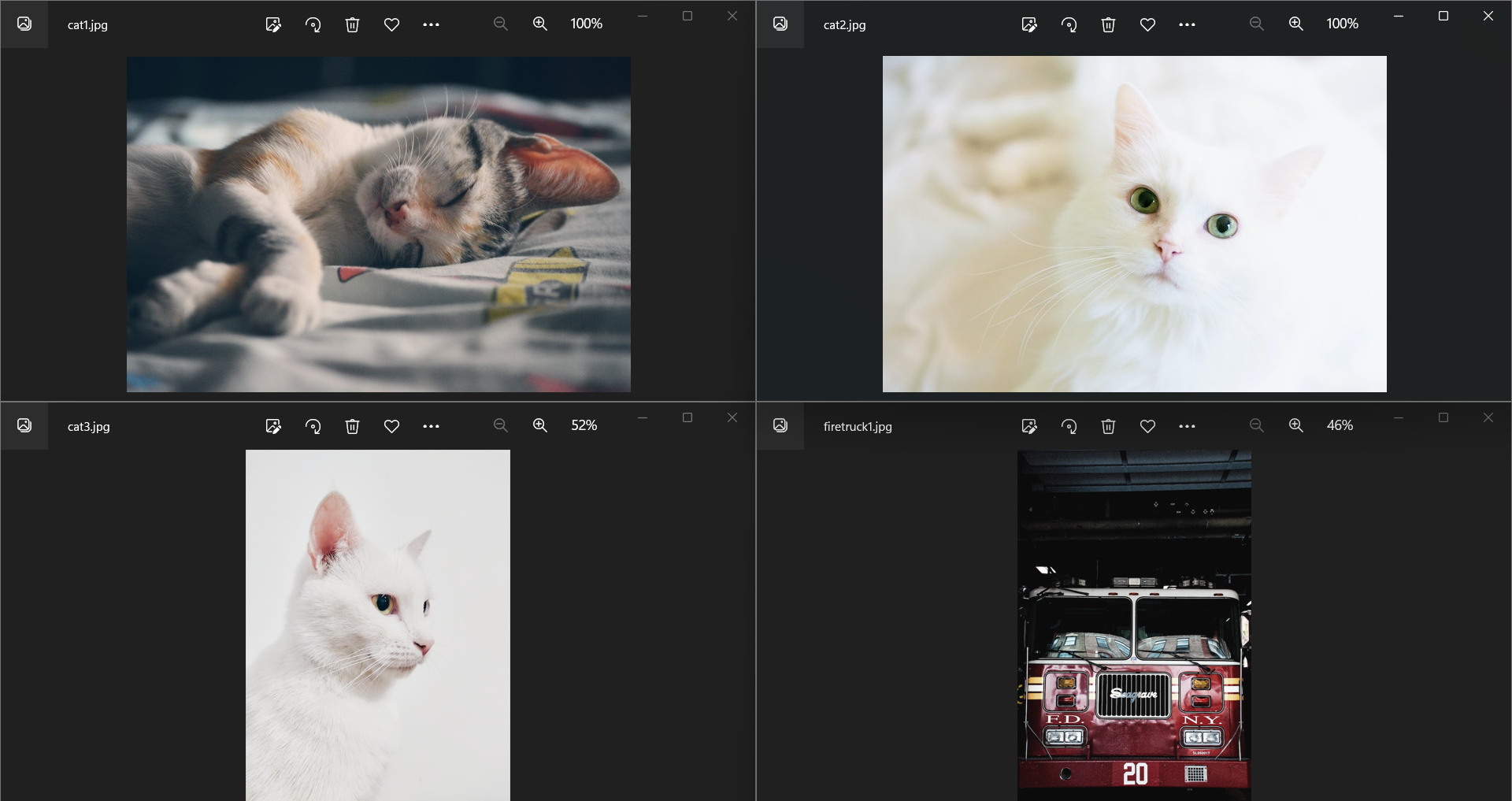
I’m going to import the necessary stuff and add a function that converts the hexadecimal string given by image hash to an integer.
from PIL import Imageimport imagehashdef hash_to_int(img_hash: imagehash.ImageHash): return int(str(img_hash), 16)The reason for the hash_to_int function is that is much easier to do computations using integers rather than strings, in the future if we’re going to build a service that makes use of the image hashing and computes hamming distances, we can store the int hashes in an OLAP database such as ClickHouse and use bitHammingDistance to compute the Hamming Distance.
The next snippet of code opens the images, computes the average and color hashes and for every image in the dataset it computes the hamming distance between the average hash summed with the hamming distance of the color hash.
The lower the hamming distance the more similar the images. A hamming distane of 0 means the images are equal.
A distance of zero means the hashes match, not necessarily that the image files are identical. Treat the score as a similarity signal and tune any matching threshold against your own images.
def main(): images = [ Image.open("cat1.jpg"), Image.open("cat2.jpg"), Image.open("cat3.jpg"), Image.open("firetruck1.jpg") ] average_hashes = [hash_to_int(imagehash.average_hash(image)) for image in images] color_hashes = [hash_to_int(imagehash.colorhash(image)) for image in images] image_hashes = list(zip(images, average_hashes, color_hashes)) source = image_hashes[0] for image in image_hashes: hamming_average_hash = bin(source[1] ^ image[1]).count("1") hamming_color_hash = bin(source[2] ^ image[2]).count("1") hamming_distance = hamming_average_hash + hamming_color_hash print("Hamming Distance between", source[0].filename, "and", image[0].filename, "is", hamming_distance)if __name__ == '__main__': main()To compute the hamming distance, you’ll need to XOR the two integers and then count the number of 1 bits bin(source[1] ^ image[1]).count("1"). That’s it.
If the run the program with the source variable set to cat1.jpg, source = image_hashes[0], we get the following result:
Hamming Distance between cat1.jpg and cat1.jpg is 0Hamming Distance between cat1.jpg and cat2.jpg is 36Hamming Distance between cat1.jpg and cat3.jpg is 39Hamming Distance between cat1.jpg and firetruck1.jpg is 33If we look at our dataset the first image cat1 is somewhat visually similar to the image of the firetruck.
If we run the program with the source variable set to cat2.jpg we can see that cat2 is similar to cat3 since both images contain white cats.
Hamming Distance between cat2.jpg and cat1.jpg is 36Hamming Distance between cat2.jpg and cat2.jpg is 0Hamming Distance between cat2.jpg and cat3.jpg is 23Hamming Distance between cat2.jpg and firetruck1.jpg is 47Conclusion
We used a Python image hashing library to compute the average and color hash of some images and then we determined which images are similar to each other by computing the hamming distance of the hashes.
Thanks for reading and build something fun! 🔨
References
- https://practicaldatascience.co.uk/data-science/how-to-use-image-hashing-to-identify-visually-similar-or-duplicate-images
- https://pypi.org/project/ImageHash/
Full Code
"""pip install imagehashpip install six"""from PIL import Imageimport imagehashdef hash_to_int(img_hash: imagehash.ImageHash): return int(str(img_hash), 16)def main(): images = [ Image.open("cat1.jpg"), Image.open("cat2.jpg"), Image.open("cat3.jpg"), Image.open("firetruck1.jpg") ] average_hashes = [hash_to_int(imagehash.average_hash(image)) for image in images] color_hashes = [hash_to_int(imagehash.colorhash(image)) for image in images] image_hashes = list(zip(images, average_hashes, color_hashes)) source = image_hashes[0] for image in image_hashes: hamming_average_hash = bin(source[1] ^ image[1]).count("1") hamming_color_hash = bin(source[2] ^ image[2]).count("1") hamming_distance = hamming_average_hash + hamming_color_hash print("Hamming Distance between", source[0].filename, "and", image[0].filename, "is", hamming_distance)if __name__ == '__main__': main()