
A tour of concurrency in Python
Introduction
Hello everyone! 👋
This article will be a simple and basic tour of Python’s concurrency models. We’ll start with threads, then move to processes, and finally we will cover asyncio. I’ll show you how to interact with these mechanisms using some low-level APIs then move to higher-level more modern APIs. I’ll also show you some utility primitives for synchronization.
I won’t cover all of it because all the info is available on the official Python documentation website but after reading this article you will have a good understanding of Python’s concurrency model.
Threads
One of the main concurrency models are threads. Your program runs inside a Process and inside the process there are multiple threads. Because threads run inside a process container they share all the resources from that process.
Threads may appear to run in parallel at the same time but in fact they don’t. Python has the GIL (Global Interpreter Lock) and because of that only one thread runs at the same time, but because they switch so fast it appears as they’re running in parallel.
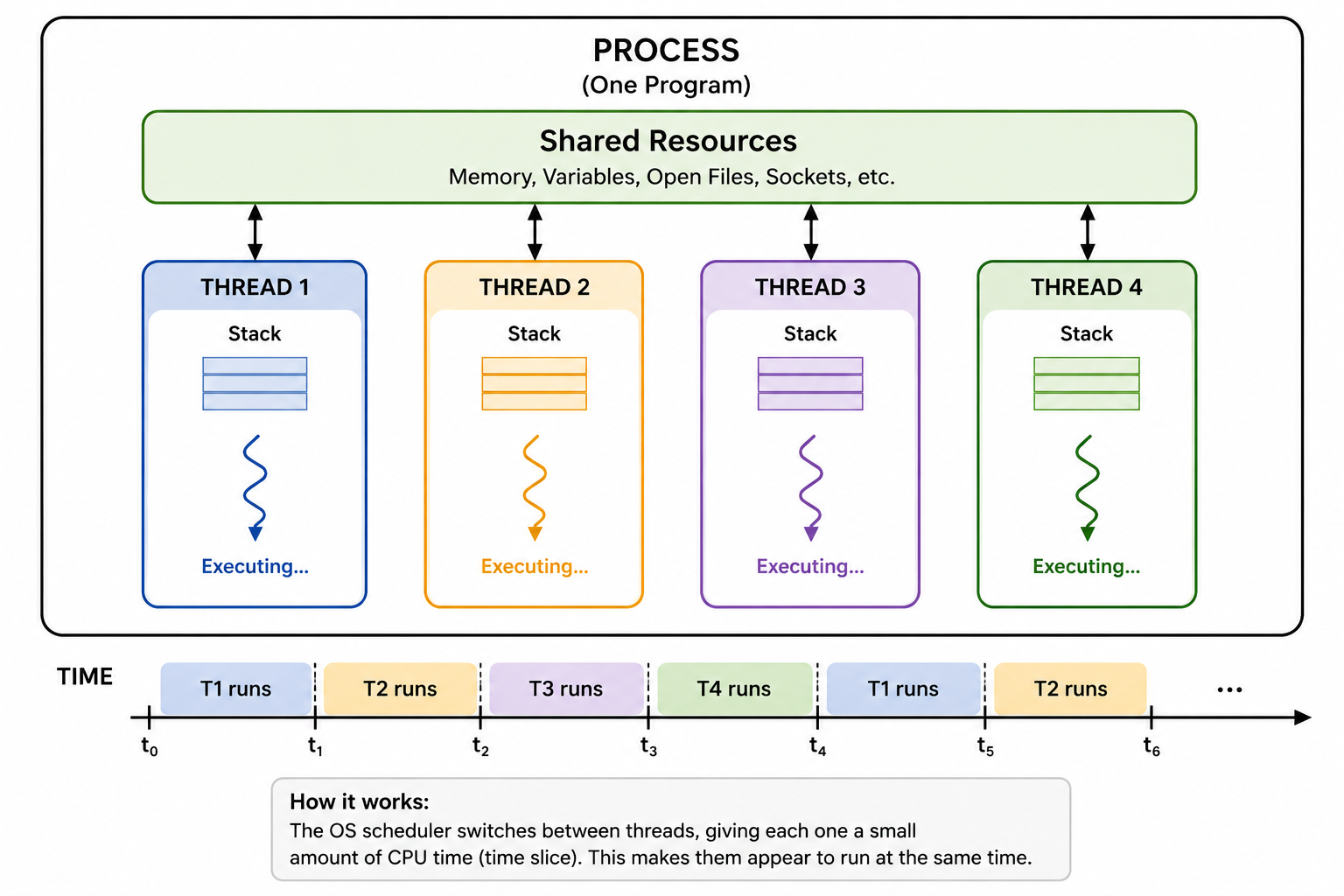
Back in the day computers had only one CPU core and the OS and application were sharing the core. The code could only run on one core and for the OS to allow multitasking it needed to allocate each application a time slice on the core, same happens today, but now we have access to multiple cores and we can run things in parallel.
In other languages such as Java threads could be scheduled on different cores making them run in parallel. But in Python, because of the GIL, it only allows one thread to run at the same time per process.
Threads are lightweight compared to Processes, but they are also expensive when compared to coroutines.
| Coroutine | Thread | Process | |
|---|---|---|---|
| Creation | Very cheap | Moderate | Expensive |
| Memory | Very low | Higher | Much higher |
| Context switch | Very cheap | OS-level, more expensive | OS-level, most expensive |
| Memory space | Shared | Shared | Separate |
| Scheduling | Event loop | OS | OS |
| Typical scale | Thousands–millions* | Hundreds–thousands | Usually relatively few |
Because when creating a thread you need create the shared resources as well, each thread has its own stack and this does not scale well if you try to create a million threads. The OS code which manages the threads also needs to schedule them, and if there are many threads to be scheduled then it will hit a bottleneck and the performance will drop. Same thing goes with processes.
A fork bomb is a type of “virus” that forks indefinitely, the OS will create the processes until all resources are exhausted, and they can’t be scheduled reliably forcing the system to crash.
Thread
This is some example code that starts two threads, the target is the thread_target function which will be run on the
two threads.
import randomfrom threading import Threadclass Program: def __init__(self): self._shared_x = 2 def thread_target(self): print("Hello from thread") for i in range(1_000_000): self._shared_x += random.randint(0, i) def main(self): th_one = Thread(target=self.thread_target) th_two = Thread(target=self.thread_target) th_one.start() th_two.start() th_one.join() th_two.join() print("Shared X:", self._shared_x)if __name__ == '__main__': program = Program() program.main()We need to join the threads because if we don’t, the main thread will finish and the process will exit, leaving the other two threads orphaned.
Timer
The Timer is a nice utility class that you can use when you want to schedule an action. It starts its own thread and executes that action. It’s useful to implement heart beats or checking for some things, like authorization token refreshes.
Here’s a simple coding example for printing a heartbeat:
from threading import Timerfrom time import sleepclass Program: def __init__(self): self._timer: Timer | None = Timer(5, self.heartbeat) def heartbeat(self): print("Heartbeat") self._timer = Timer(5, self.heartbeat) self._timer.start() def run(self): print("Running the program.") self._timer.start() while True: sleep(1) def stop(self): self._timer.cancel() self._timer = Noneif __name__ == "__main__": program = Program() try: program.run() except KeyboardInterrupt: program.stop()Concurrent Futures: Thread Pool
This example is similar to the first one, but it uses a higher-level API for scheduling the threads.
import randomfrom concurrent.futures import ThreadPoolExecutorclass Program: def __init__(self): self._shared_x = 2 def thread_target(self, low): print("Hello from thread") for i in range(1_000_000): self._shared_x += random.randint(min(low, i), i) return self._shared_x def main(self): th_pool = ThreadPoolExecutor(max_workers=5) th_one = th_pool.submit(self.thread_target, 0) th_two = th_pool.submit(self.thread_target,2) print("Shared X after first thread", th_one.result()) print("Shared X after second thread", th_two.result()) print("Shared X:", self._shared_x)if __name__ == '__main__': program = Program() program.main()It also initializes a thread pool of fixed size. What pool.submit returns is a Future. You can check the result
of the future using .result() or the exception with .exception().
The docs contain all the detailed functions you can call on a Future object.
Processes
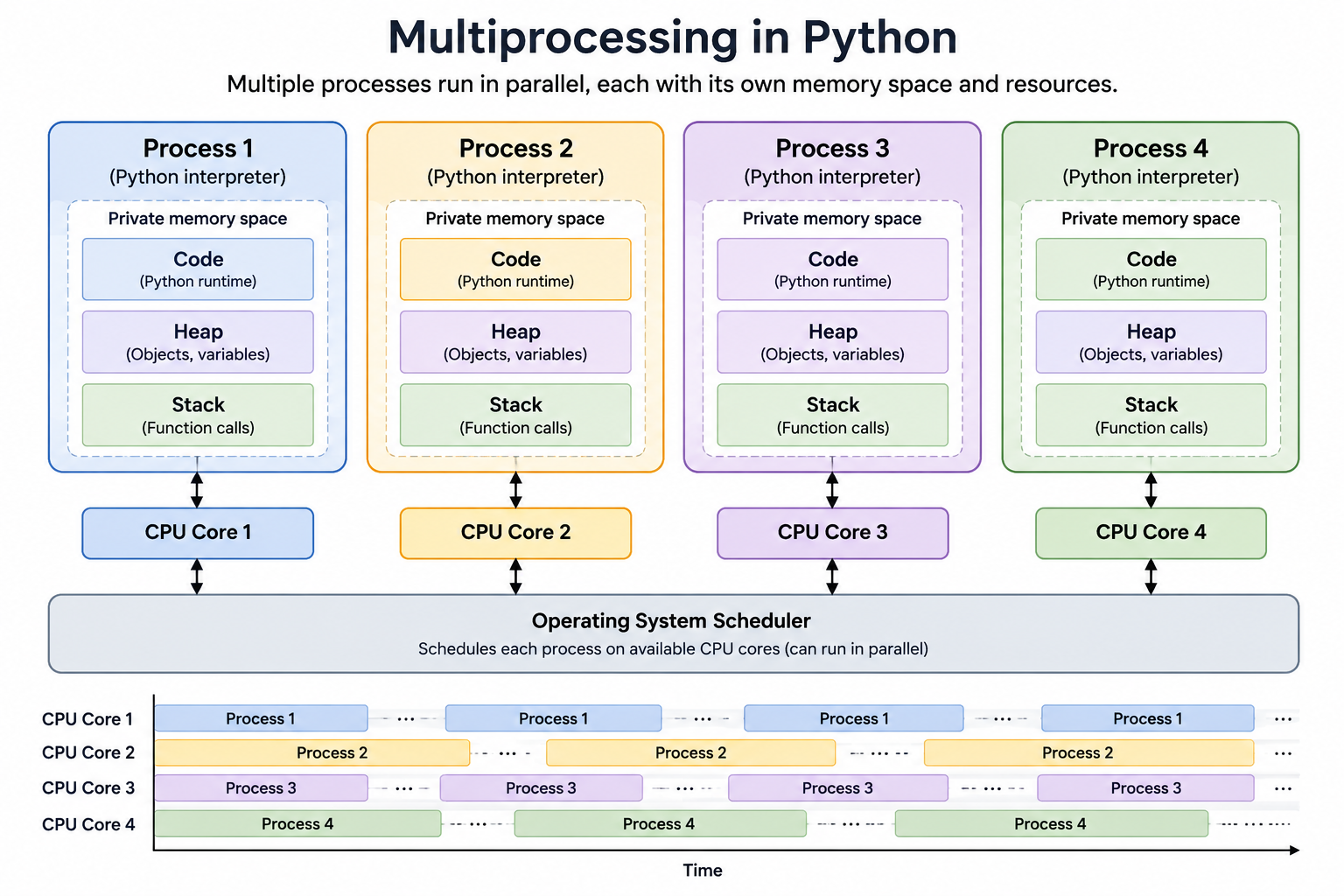
Processes are managed by the operating system, and they serve as a container for threads. They are used to run things in parallel. You can bypass Python’s GIL limitations by splitting work across processes, and if your work involves a lot of IO or network activity you can start an async loop inside each process.
Creating multiple processes is a great way to tackle a CPU bound task, and because they are managed by the OS each process runs on its own core, and if you have more processes than available cores then each process will get a time slice on the CPU core.
Processes have their own private memory, but the API allows you to share some part of the memory with other processes. To communicate between processes you can use Queues and Pipes.
Multiprocessing
The multiprocessing API is similar to the threading API. You can spawn individual processes or use a process pool.
from multiprocessing import Processdef f(name): print('hello', name)if __name__ == '__main__': p = Process(target=f, args=('bob',)) p.start() p.join()And a process pool example:
from multiprocessing import Pooldef f(x): return x*xif __name__ == '__main__': with Pool(5) as p: print(p.map(f, [1, 2, 3]))The examples are copied from Python’s official multiprocessing docs which is a great deep dive on the subject.
Concurrent Futures: Process Pool
You can use the same concurrent.futures API to create a process pool like you would create a thread pool. In this example it’s worth noticing that the _shared_x variable is not actually shared, each process gets its own copy and the main process doesn’t modify it at all.
import randomfrom concurrent.futures import ProcessPoolExecutorclass Program: def __init__(self): self._shared_x = 2 def target(self, low): print("Hello from process") for i in range(1_000_000): self._shared_x += random.randint(min(low, i), i) return self._shared_x def main(self): process_pool = ProcessPoolExecutor(max_workers=5) th_one = process_pool.submit(self.target, 0) th_two = process_pool.submit(self.target,2) print("Shared X after first process", th_one.result()) print("Shared X after second process", th_two.result()) print("Shared X:", self._shared_x)if __name__ == '__main__': program = Program() program.main()If you run the example it should print something like:
Hello from processHello from processShared X after first process 250199267754Shared X after second process 249818236816Shared X: 2Asyncio
Asyncio is one of my favorite concurrency models in Python. When developing web services you usually want to serve multiple users at the same time. Before this model was used, this was achieved by creating a thread or a process for each request. This worked fine, but it does not scale well, there’s a limit of how many processes we can create and schedule and same thing goes with the threads.
And let’s be honest with today’s Web APIs most requests are just fetching some data from some database, cache, make a network call or crunching some numbers. Creating a new process for every request would be overkill.
An application built with asyncio in mind usually uses a single process, and on that process the event loop runs, instead of threads we use coroutines, which are similar.
Threads are usually managed by the operating system and this is less efficient and coroutines are managed by the Python
interpreter. Threads get interrupted by the OS in order to let other threads/processes run and coroutines tell you
exactly when they can be interrupted by using a keyword like await.
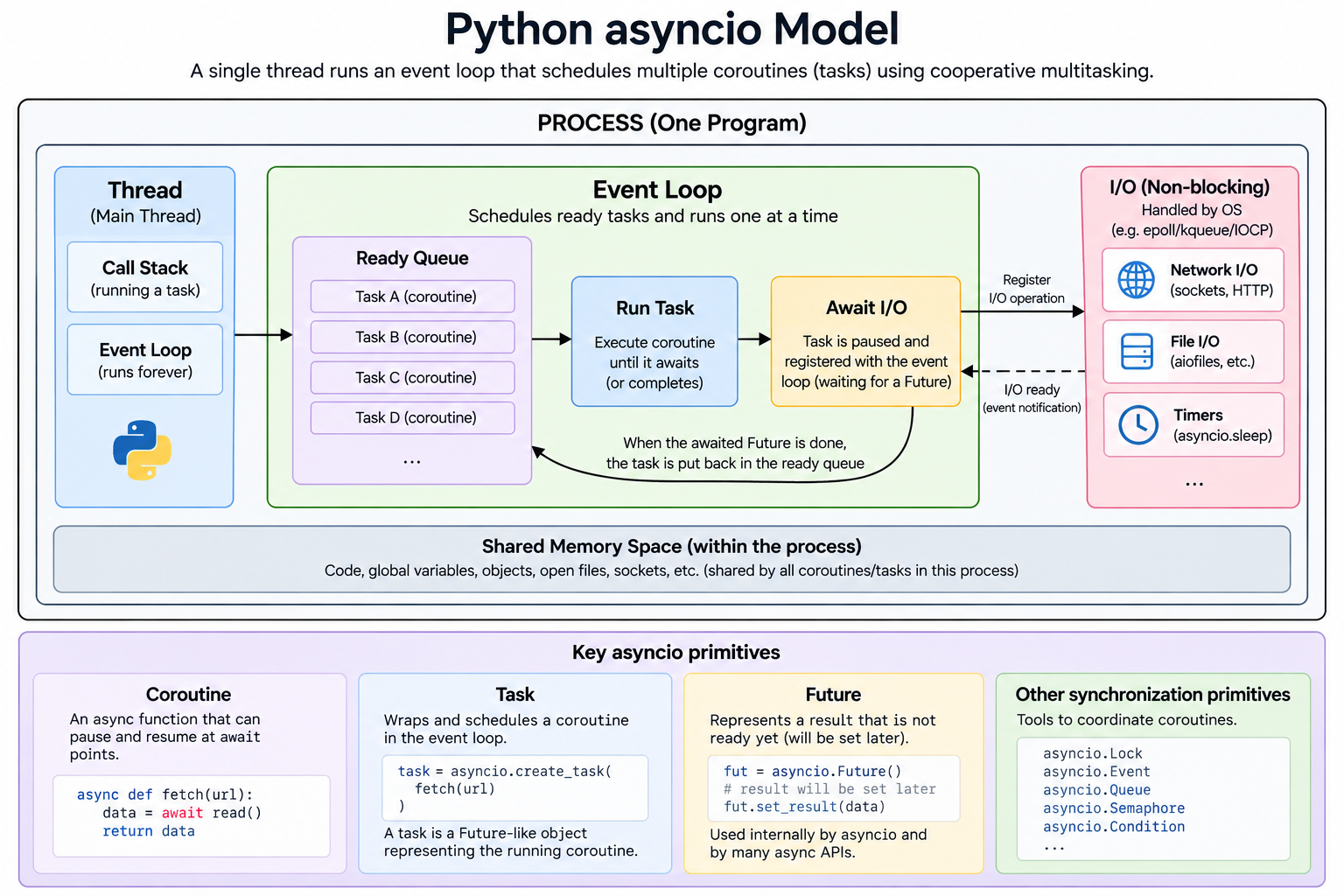
When a coroutine voluntarily yields execution back to the event loop, the event loop picks another coroutine to run.
It’s very important than when using this model the coroutine doesn’t block the event loop by never awaiting other
tasks or spends a lot of time crunching numbers because the event loop is single threaded and that means that other
things will not run anymore.
This model works great for web applications because they serve requests in parallel, but if you’re writing a simple script that makes requests in a synchronous way then you won’t benefit much, for example:
import asyncioasync def task(): await fetch_data() # wait until finished await fetch_data() # then start this await fetch_data() await fetch_data() asyncio.run(task())If you can, run all the requests in parallel with asyncio.gather or more modern alternative TaskGroup.
async def fetch_data(n): print(f"Fetching {n}") await asyncio.sleep(1) print(f"Finished {n}") return nasync def main(): results = await asyncio.gather( fetch_data(1), fetch_data(2), fetch_data(3), fetch_data(4), ) print(results)asyncio.run(main())import asyncioasync def fetch_data(n): print(f"Fetching {n}") await asyncio.sleep(1) print(f"Finished {n}") return nasync def main(): async with asyncio.TaskGroup() as tg: task1 = tg.create_task(fetch_data(1)) task2 = tg.create_task(fetch_data(2)) task3 = tg.create_task(fetch_data(3)) task4 = tg.create_task(fetch_data(4)) print(task1.result()) print(task2.result()) print(task3.result()) print(task4.result())asyncio.run(main())Conclusion
I hope this article gave you a basic introduction to Python’s concurrency models. I haven’t covered synchronization primitives, usually I’ve only used the mutex, asyncio.shield and asyncio.Lock, in my opinion when writing user applications and web services it’s better to keep things simpler.
The official Python documentation is a great resource for diving deeper in these topics.
Thank you for reading!